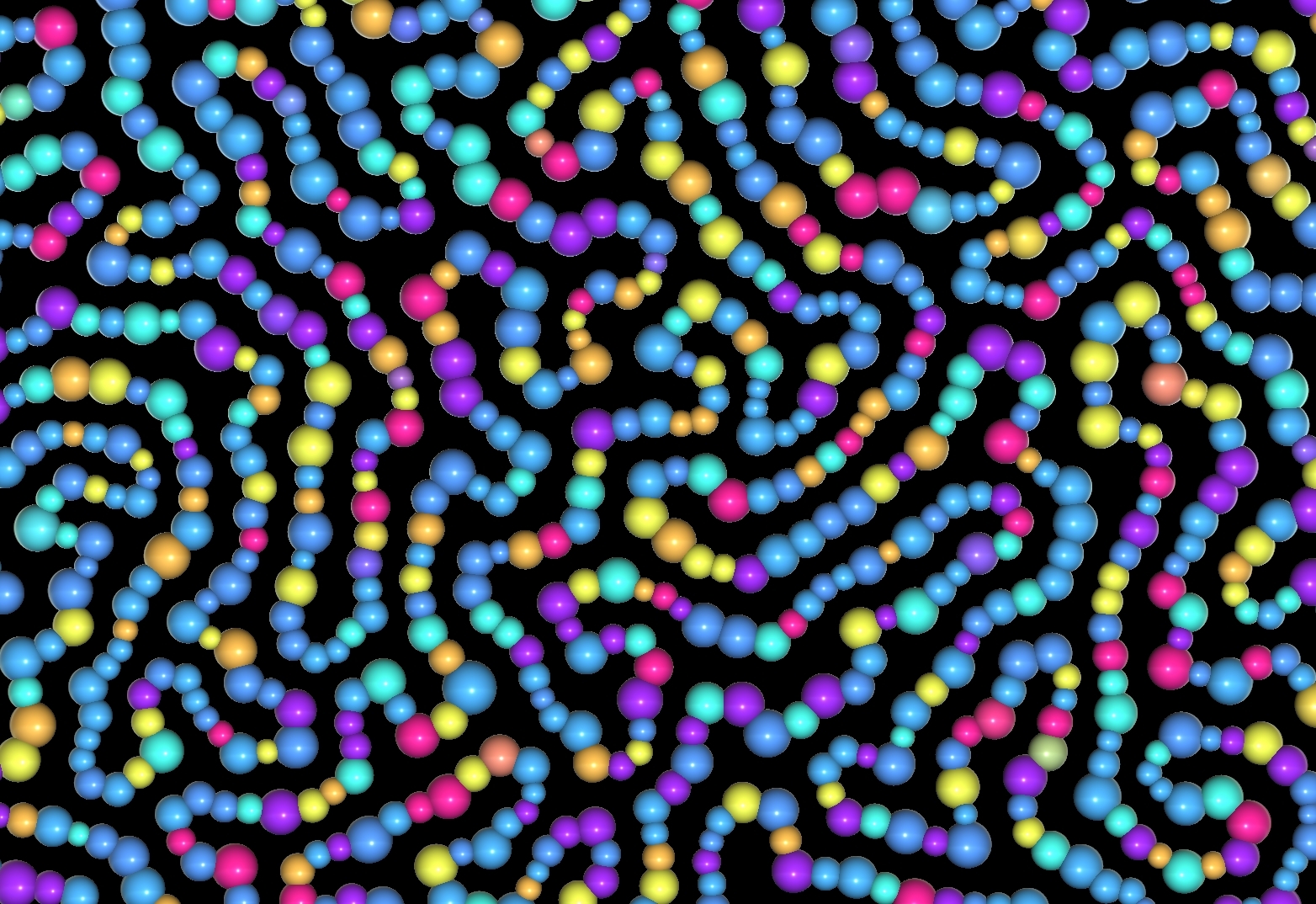
図4.1: CellularGrowthSphere.scene
Based on the algorithm of "Cell Division and Growth Algorithm 1" * 3 , which is introduced in the tutorial of iGeo * 2 , a library for procedural modeling in the field of construction by Processing * 1 , the GPU is used for cells. Develop a program that expresses division and growth.
The sample in this chapter is "Cellular Growth" from
https://github.com/IndieVisualLab/UnityGraphicsProgramming3
.
In this chapter, through the cell division and growth program on the GPU
I will explain about.
[*1] https://processing.org/
[*2] http://igeo.jp
[*3] http://igeo.jp/tutorial/55.html
図4.1: CellularGrowthSphere.scene
First, I will introduce a simple implementation of only Particles, and then explain how to introduce Edge and express the network structure that grows and becomes complicated.
In the simulation program, we prepare two structures, Particle and Edge, to imitate the behavior of the cell.
One particle represents one cell and behaves as follows.
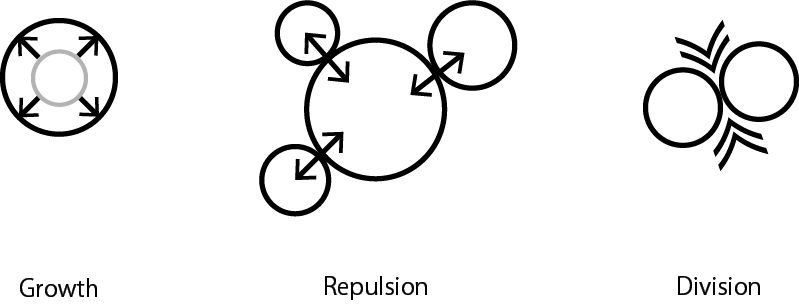
Figure 4.2: Cell behavior
Edge expresses how cells stick to each other. By connecting the divided particles with Edge and attracting them like a spring, the particles are attached to each other to express the network structure of cells.
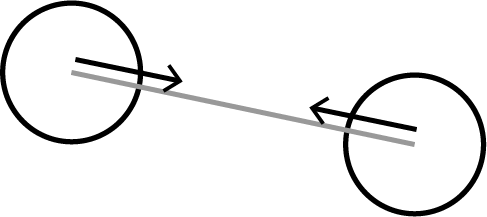
Figure 4.3: Edge sticks connected particles together
In this section, we will explain by gradually implementing the necessary functions.
First, we will explain the behavior and implementation of particles through the sample CellularGrowthParticleOnly.cs that implements only the behavior of particles.
The structure of Particles is defined as follows.
Particle.cs
[StructLayout(LayoutKind.Sequential)]
public struct Particle_t {
    public Vector2 position; // position
    public Vector2 velocity; // velocity
    float radius; // size
    float threshold; // maximum size
    int links; // Number of connected Edges (used in the scene below)
    uint alive; // activation flag
}
In this project, Particles are increased or decreased at any time, so the object pool is managed by Append / ConsumeStructuredBuffer so that the number of objects can be controlled on the GPU.
Append / ConsumeStructuredBuffer * 4 * 5 is a container for performing LIFO (Last In First Out) on the GPU made available from Direct3D11. AppendStructuredBuffer is responsible for adding data, and ConsumeStructuredBuffer is responsible for retrieving data.
By using this container, you can dynamically control the number on the GPU and express the increase or decrease of objects.
[*4] https://docs.microsoft.com/ja-jp/windows/desktop/direct3dhlsl/sm5-object-appendstructuredbuffer
[*5] https://docs.microsoft.com/ja-jp/windows/desktop/direct3dhlsl/sm5-object-consumestructuredbuffer
First, initialize the particle buffer and the object pool buffer.
CellularGrowthParticleOnly.cs
protected void Start () {
    // Particle initialization
    particleBuffer = new PingPongBuffer(count, typeof(Particle_t));

    // Initialize the object pool
    poolBuffer = new ComputeBuffer(
        count,
        Marshal.SizeOf(typeof(int)),
        ComputeBufferType.Append
    );
    poolBuffer.SetCounterValue(0);
    countBuffer = new ComputeBuffer(
        4,
        Marshal.SizeOf(typeof(int)),
        ComputeBufferType.IndirectArguments
    );
    countBuffer.SetData(countArgs);

    // Object pool that manages divisible objects
    dividablePoolBuffer = new ComputeBuffer(
        count,
        Marshal.SizeOf(typeof(int)),
        ComputeBufferType.Append
    );
    dividablePoolBuffer.SetCounterValue (0);

    // Particle and object pool initialization Kernel execution (see below)
    InitParticlesKernel();

    ...
}
The PingPongBuffer class used as particleBuffer prepares two buffers, one for reading and the other for writing, and it is used in the scene of calculating the interaction of Particles described later.
poolBuffer and divideablePoolBuffer are Append / ConsumeStructuredBuffer, and ComputeBufferType.Append is specified in the argument ComputeBufferType at the time of initialization. Append / ConsumeStructuredBuffer can handle variable length data, but as you can see from the initialization code, the upper limit of the number of data must be set when creating the buffer.
The poolBuffer created as an int type Append / ConsumeStructuredBuffer is
It functions as an object pool according to the flow. In other words, the int buffer of poolBuffer always points to the index of inactive Particles, and can be made to function as an object pool by fetching it as needed. ( Fig. 4.4 )
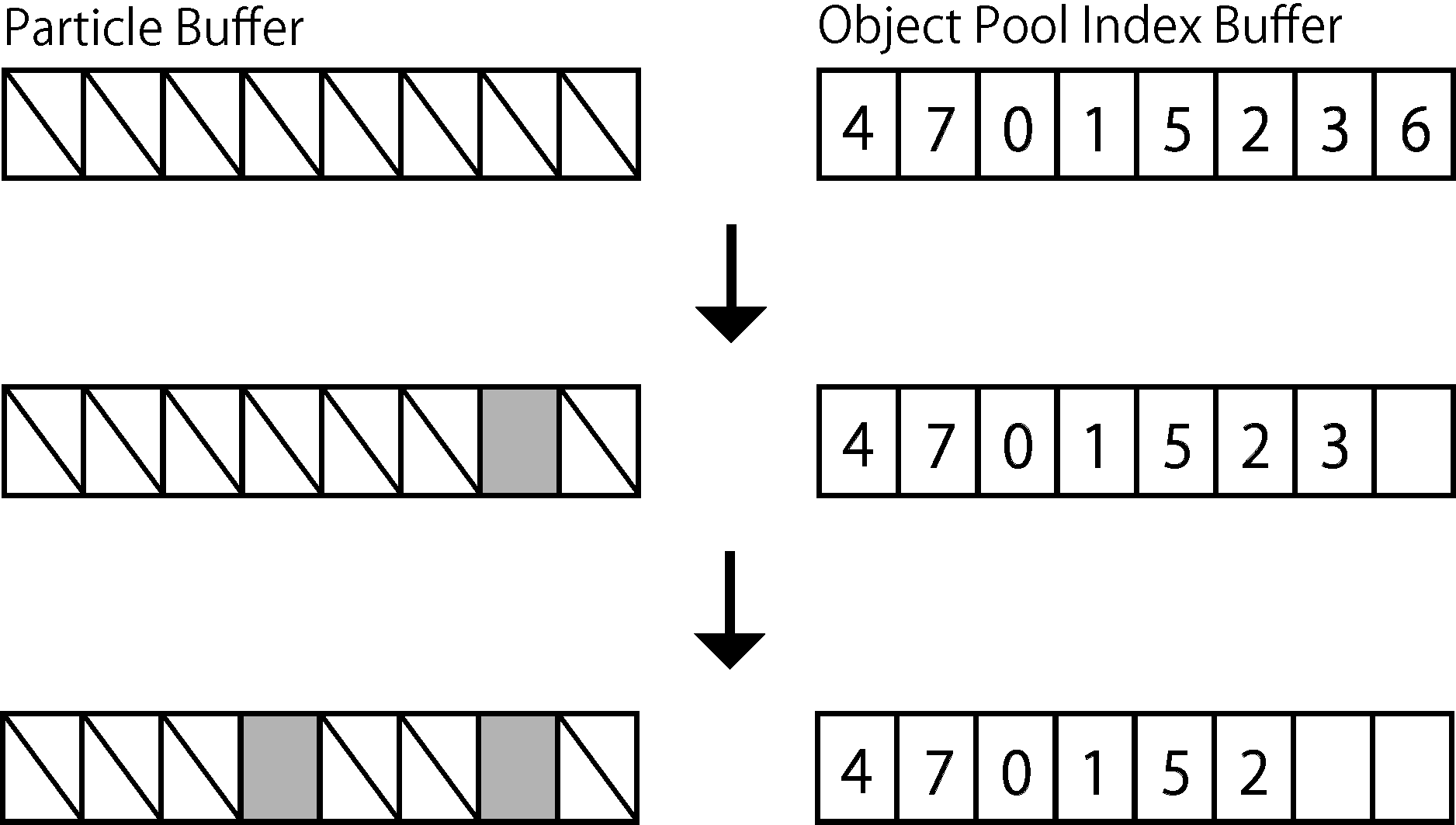
Figure 4.4: The array on the left represents particleBuffer and the right represents poolBuffer.In the initial state, all particles in particleBuffer are inactive, but when particles appear, the index of the inactive Particle is taken out from poolBuffer and the corresponding index is displayed. Activate the particles in the area
countBuffer is an int type buffer and is used to manage the number of object pools.
The InitParticlesKernel called at the end of Start runs the GPU kernel that initializes the Particles and object pool.
CellularGrowthParticleOnly.cs
protected void InitParticlesKernel()
{
    var kernel = compute.FindKernel("InitParticles");
    compute.SetBuffer(kernel, "_Particles", particleBuffer.Read);

    // Specify the object pool as AppendStructuredBuffer
    compute.SetBuffer(kernel, "_ParticlePoolAppend", poolBuffer);

    Dispatch1D(kernel, count);
}
The following is the kernel to be initialized.
CellularGrowth.compute
THREAD
void InitParticles(uint3 id : SV_DispatchThreadID)
{
  uint idx = id.x;

  uint count, strides;
  _Particles.GetDimensions(count, strides);
  if (idx >= count)
    return;

  // Particle initialization
  Particle p = create();
  p.alive = false; // Inactivate all Particles
  _Particles[idx] = p;

  // Add particle index to object pool
  _ParticlePoolAppend.Append(idx);
}
By executing the above kernel, all the particles in the particleBuffer will be initialized and inactive, and the poolBuffer will store the indexes of all the particles in the inactive state.
Now that we have initialized the particles, let's make them appear. In CellularGrowthParticleOnly.cs, particles are generated at the position where the mouse is clicked.
CellularGrowthParticleOnly.cs
protected void Update() {
    ...
    if(Input.GetMouseButton(0))
    {
        EmitParticlesKernel(GetMousePoint());
    }
    ...
}
When the mouse is clicked, it runs the EmitParticlesKernel to spawn particles.
CellularGrowthParticleOnly.cs
protected void EmitParticlesKernel(Vector2 point, int emitCount = 32)
{
    // Compare the number of object pools with emitCount,
    // Prevent _ParticlePoolConsume.Consume () from running when the object pool is empty
    emitCount = Mathf.Max(
        0,
        Mathf.Min (emitCount, CopyPoolSize (poolBuffer))
    );
    if (emitCount <= 0) return;

    var kernel = compute.FindKernel("EmitParticles");
    compute.SetBuffer(kernel, "_Particles", particleBuffer.Read);

    // Specify the object pool as ConsumeStructuredBuffer
    compute.SetBuffer(kernel, "_ParticlePoolConsume", poolBuffer);

    compute.SetVector("_Point", point);
    compute.SetInt("_EmitCount", emitCount);

    Dispatch1D(kernel, emitCount);
}
As you can see from the fact that the poolBuffer specified in the _ParticlePoolAppend parameter in InitParticlesKernel is specified in the _ParticlePoolConsume parameter in EmitParticlesKernel, the same buffer is specified in Append / ConsumeStructuredBuffer.
Depending on the purpose of processing on the GPU, just changing the setting of whether to add a buffer (AppendStructuredBuffer) or to retrieve (ConsumeStructuredBuffer), the same buffer is sent to the GPU side from the CPU side. Become.
At the beginning of EmitParticlesKernel, we compare the size of the object pool obtained by emitCount and GetPoolSize, but this is to prevent index retrieval from the pool when the object pool is empty, if it is an empty object. Attempting to retrieve more indexes from the pool (running _ParticlePoolConsume.Consume inside the GPU kernel) results in unexpected behavior.
CellularGrowth.compute
THREAD
void EmitParticles(uint3 id : SV_DispatchThreadID)
{
  // Avoid adding more Particles than _EmitCount
  if (id.x >= (uint) _EmitCount)
    return;

  // Extract the index of the inactive Particle from the object pool
  uint idx = _ParticlePoolConsume.Consume();

  Particle c = create();

  // Place the Particle at a position slightly offset from the mouse position
  float2 offset = random_point_on_circle(id.xx + float2(0, _Time));
  c.position = _Point.xy + offset;
  c.radius = nrand(id.xx + float2(_Time, 0));

  // Set the activated Particle to the inactive index location
  _Particles[idx] = c;
}
In Emit Particles, the index of the inactive particle is taken out from the object pool, and the activated particle is set at the position of the corresponding index in the particle Buffer.
By the above kernel processing, particles can be spawned while considering the number of object pools.
Now that we have managed the appearance of particles, it's time to program the behavior of particles.
The cells of the simulator developed in this chapter behave as follows, as shown in Figure 4.2 .
Growth and Repulsion are executed every frame in Update.
CellularGrowthParticleOnly.cs
protected void Update() {
...
UpdateParticlesKernel();
...
}
...
protected void UpdateParticlesKernel()
{
var kernel = compute.FindKernel("UpdateParticles");
// Set the read buffer
compute.SetBuffer(kernel, "_ParticlesRead", particleBuffer.Read);
// Set a buffer for writing
compute.SetBuffer(kernel, "_Particles", particleBuffer.Write);
compute.SetFloat ("_Drag", drag); // Speed attenuation
compute.SetFloat ("_Limit", limit); // Speed limit
compute.SetFloat ("_Repulsion", repulsion); // Coefficient over repulsive distance
compute.SetFloat("_Grow", grow); // growth rate
Dispatch1D(kernel, count);
// Swap read and write buffers (Ping Pong)
particleBuffer.Swap();
}
The reason for setting the read and write buffers and swapping the buffers after processing will be described later.
Below is the Update Particles kernel.
CelluarGrowth.compute
THREAD
void UpdateParticles(uint3 id : SV_DispatchThreadID)
{
  uint idx = id.x;

  uint count, strides;
  _ParticlesRead.GetDimensions(count, strides);
  if (idx >= count)
    return;

  Particle p = _ParticlesRead[idx];

  // Process only activated Particles
  if (p.alive)
  {
    // Grow: Particle growth
    p.radius = min(p.threshold, p.radius + _DT * _Grow);

    // Repulsion: Collisions between Particles
    for (uint i = 0; i < count; i++)
    {
      Particle other = _ParticlesRead[i];
      if(i == idx || !other.alive) continue;

      // Calculate the distance between particles
      float2 dir = p.position - other.position;
      float l = length(dir);

      // The distance between the particles is greater than the sum of their radii * _Repulsion
      // If they are close, they are in conflict
      float r = (p.radius + other.radius) * _Repulsion;
      if (l < r)
      {
        p.velocity += normalize(dir) * (r - l);
      }
    }

    float2 vel = p.velocity * _DT;
    float vl = length(vel);
    // check if velocity length over than zero to avoid NaN position
    if (vl > 0)
    {
      p.position + = normalize (vel) * min (vl, _Limit);

      // Attenuate velocity according to _Drag parameter
      p.velocity =
        normalize(p.velocity) *
        min (
          length(p.velocity) * _Drag,
          _Limit
        );
    }
    else
    {
      p.velocity = float2(0, 0);
    }
  }

  _Particles[idx] = p;
}
The UpdateParticles kernel uses a read buffer (_ParticlesRead) and a write buffer (_Particles) to calculate collisions between particles.
If the same buffer is used for both reading and writing here, there is a possibility that another thread will use the particle information after being updated by another thread for particle position calculation due to GPU parallel processing. Will appear, and a problem (data race) will occur in which the calculation is inconsistent.
If one thread does not refer to the information updated by another thread, it is not necessary to prepare separate buffers for reading and writing, but if the thread refers to the buffer updated by another thread. Like the UpdateParticles kernel, it needs to have separate read and write buffers, which alternate with each update. (It is called Ping Pong buffer because it alternates buffers after each process.)
Particle splitting is performed by coroutines at regular intervals.
Particle splitting process
It is done in the flow.
CellularGrowthParticleOnly.cs
protected void Start() {
    ...
    StartCoroutine(IDivider());
}

...

protected IEnumerator IDivider()
{
    yield return 0;
    while(true)
    {
        yield return new WaitForSeconds(divideInterval);
        Divide();
    }
}

protected void Divide() {
    GetDividableParticlesKernel();
    DivideParticlesKernel(maxDivideCount);
}

...

// Store divisible particle candidates in dividablePoolBuffer
protected void GetDividableParticlesKernel()
{
    // Reset dividablePoolBuffer
    dividablePoolBuffer.SetCounterValue (0);

    var kernel = compute.FindKernel("GetDividableParticles");
    compute.SetBuffer(kernel, "_Particles", particleBuffer.Read);
    compute.SetBuffer(kernel, "_DividablePoolAppend", dividablePoolBuffer);

    Dispatch1D(kernel, count);
}

protected void DivideParticlesKernel(int maxDivideCount = 16)
{
    // With the number you want to split (maxDivideCount)
    // Compare the number of particles that can be split (the size of the dividable PoolBuffer)
    maxDivideCount = Mathf.Min (
        CopyPoolSize (dividablePoolBuffer),
        maxDivideCount
    );

    // With the number you want to split (maxDivideCount)
    // Compare the number of particles remaining in the object pool (poolBuffer size)
    maxDivideCount = Mathf.Min (CopyPoolSize (poolBuffer), maxDivideCount);

    if (maxDivideCount <= 0) return;

    var kernel = compute.FindKernel("DivideParticles");
    compute.SetBuffer(kernel, "_Particles", particleBuffer.Read);
    compute.SetBuffer(kernel, "_ParticlePoolConsume", poolBuffer);
    compute.SetBuffer(kernel, "_DividablePoolConsume", dividablePoolBuffer);
    compute.SetInt("_DivideCount", maxDivideCount);

    Dispatch1D(kernel, count);
}
The GetDividableParticles kernel adds divisible particles (active particles) to the dividablePoolBuffer, and uses that buffer to determine the number of times to execute the DivideParticles kernel that actually performs the split processing.
How to find the number of splits is as shown at the beginning of the DivideParticlesKernel function.
Compare with. Comparing these numbers prevents the split process from running beyond the limit of the number of splits that can be split.
The following is the contents of the kernel.
CellularGrowth.compute
// Function that determines the candidate particles that can be split
// You can adjust the split pattern by changing the conditions here
bool dividable_particle(Particle p, uint idx)
{
  // Split according to growth rate
  float rate = (p.radius / p.threshold);
  return rate >= 0.95;

  // Randomly split
  // return nrand(float2(idx, _Time)) < 0.1;
}

// Function that splits particles
uint divide_particle(uint idx, float2 offset)
{
  Particle parent = _Particles[idx];
  Particle child = create();

  // Set the size in half
  float rh = parent.radius * 0.5;
  rh = max(rh, 0.1);
  parent.radius = child.radius = rh;

  // Shift the position of parent and child
  float2 center = parent.position;
  parent.position = center - offset;
  child.position = center + offset;

  // Randomly set the maximum size of the child
  float x = nrand(float2(_Time, idx));
  child.threshold = rh * lerp(1.25, 2.0, x);

  // Get the child index from the object pool and set the child particle in the buffer
  uint cidx = _ParticlePoolConsume.Consume();
  _Particles[cidx] = child;

  // Update parent particle
  _Particles[idx] = parent;

  return cidx;
}

uint divide_particle(uint idx)
{
  Particle parent = _Particles[idx];

  // Randomly shift the position
  float2 offset =
    random_point_on_circle(float2(idx, _Time)) *
    parent.radius * 0.25;

  return divide_particle(idx, offset);
}

...

THREAD
void GetDividableParticles(uint3 id : SV_DispatchThreadID)
{
  uint idx = id.x;
  uint count, strides;
  _Particles.GetDimensions(count, strides);
  if (idx >= count)
    return;

  Particle p = _Particles[idx];
  if (p.alive && dividable_particle(p, idx))
  {
    _DividablePoolAppend.Append(idx);
  }
}

THREAD
void DivideParticles(uint3 id : SV_DispatchThreadID)
{
  if (id.x >= _DivideCount)
    return;

  uint idx = _DividablePoolConsume.Consume();
  divide_particle(idx);
}
The results of cell division achieved by these processes are as follows.
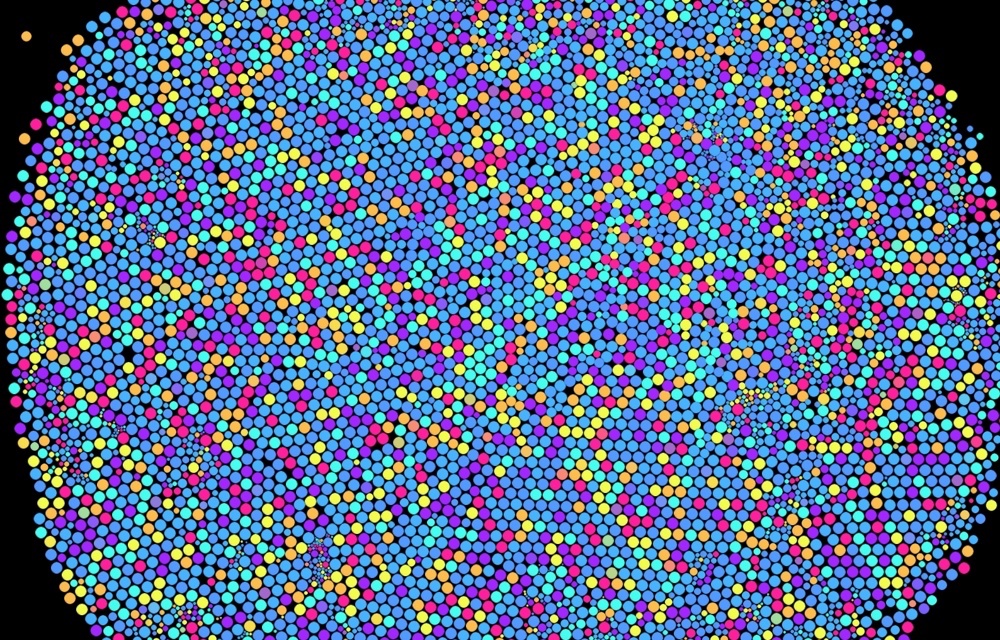
図4.5: CellularGrowthParticleOnly.scene
In order to realize how cells stick to each other, we will introduce Edge that connects particles and express cells in a network structure.
From here, we will proceed through the implementation of CellularGrowth.cs.
Edges are added when the particles split, connecting the split particles together.
The structure of Edge is defined as follows.
Edge.cs
[StructLayout(LayoutKind.Sequential)]
public struct Edge_t
{
    public int a, b; // Index of two Particles connected by Edge
    public Vector2 force; // The force to attach two Particles together
    uint alive; // activation flag
}
Edge also increases or decreases like Particle, so manage it with Append / ConsumeStructuredBuffer.
The network structure is divided according to the following flow.
It is the Particle that actually splits, but the term "splittable Edge" here is convenient when processing the Edge that is connected to the Particle that splits from the split pattern that will be introduced later. For good reason, the network structure is split in Edge units.
The above-mentioned flow of division allows one particle to repeat division and generate a large network structure.
Edge splitting is performed by coroutines at regular intervals, similar to CellularGrowthParticleOnly.cs in the previous section.
CellularGrowth.cs
protected IEnumerator IDivider()
{
    yield return 0;
    while(true)
    {
        yield return new WaitForSeconds(divideInterval);
        Divide();
    }
}

protected void Divide()
{
    // 1. Get divisible Edge candidates and store them in the divideablePoolBuffer
    GetDividableEdgesKernel();

    int dividableEdgesCount = CopyPoolSize (dividablePoolBuffer);
    if(dividableEdgesCount == 0)
    {
        // 2. If the splittable Edge is empty,
        // Split a Particle with 0 connected Edges (Particle with 0 links) and split it.
        // Connect two Particles with Edge
        DivideUnconnectedParticles();
    } else
    {
        // 3. If there is a splittable Edge, take the Edge from the divideablePoolBuffer and split it.
        // Execute Edge split according to split pattern (described later)
        switch(pattern)
        {
            case DividePattern.Closed:
                // Patterns that generate closed network structures
                DivideEdgesClosedKernel(
                    dividableEdgesCount,
                    maxDivideCount
                );
                break;
            case DividePattern.Branch:
                // Branching pattern
                DivideEdgesBranchKernel(
                    dividableEdgesCount,
                    maxDivideCount
                );
                break;
        }
    }
}

...

protected void GetDividableEdgesKernel()
{
    // Reset the buffer that stores the splittable Edge
    dividablePoolBuffer.SetCounterValue (0);

    var kernel = compute.FindKernel("GetDividableEdges");
    compute.SetBuffer(
        kernel, "_Particles",
        particlePool.ObjectPingPong.Read
    );
    compute.SetBuffer(kernel, "_Edges", edgePool.ObjectBuffer);
    compute.SetBuffer(kernel, "_DividablePoolAppend", dividablePoolBuffer);

    // Maximum number of particle connections
    compute.SetInt("_MaxLink", maxLink);

    Dispatch1D(kernel, count);
}

...

protected void DivideUnconnectedParticles()
{
    var kernel = compute.FindKernel("DivideUnconnectedParticles");
    compute.SetBuffer(
        kernel, "_Particles",
        particlePool.ObjectPingPong.Read
    );
    compute.SetBuffer(
        kernel, "_ParticlePoolConsume",
        particlePool.PoolBuffer
    );
    compute.SetBuffer(kernel, "_Edges", edgePool.ObjectBuffer);
    compute.SetBuffer(kernel, "_EdgePoolConsume", edgePool.PoolBuffer);

    Dispatch1D(kernel, count);
}
The kernels (GetDividableEdges) for getting divisible edges are:
CellularGrowth.compute
// Determine if it can be split
bool dividable_edge(Edge e, uint idx)
{
  Particle pa = _Particles[e.a];
  Particle pb = _Particles[e.b];

  // The number of particle connections does not exceed the maximum number of connections (_MaxLink)
  // Allow splitting if the splitting conditions defined in dividable_particle are met
  return
    !(pa.links >= _MaxLink && pb.links >= _MaxLink) &&
    (dividable_particle(pa, e.a) && dividable_particle(pb, e.b));
}

...

// Get a splittable Edge
THREAD
void GetDividableEdges(uint3 id : SV_DispatchThreadID)
{
  uint idx = id.x;
  uint count, strides;
  _Edges.GetDimensions(count, strides);
  if (idx >= count)
    return;

  Edge e = _Edges[idx];
  if (e.alive && dividable_edge(e, idx))
  {
    _DividablePoolAppend.Append(idx);
  }
}
If there is no splittable Edge, run the following kernel (Divide Disconnected Particles) that splits the following connected Edgeless Particles.
CellularGrowth.compute
// A function that creates an Edge that connects Particles with index a and Particles b
void connect(int a, int b)
{
  // Fetch the inactive Edge index from the Edge object pool
  uint eidx = _EdgePoolConsume.Consume();

  // Using Atomic operation (described later)
  // Increment the number of connections for each particle
  InterlockedAdd(_Particles[a].links, 1);
  InterlockedAdd(_Particles[b].links, 1);

  Edge e;
  ea = a;
  e.b = b;
  e.force = float2(0, 0);
  e.alive = true;
  _Edges[eidx] = e;
}

...

// Split a Particle that does not have a connected Edge
THREAD
void DivideUnconnectedParticles(uint3 id : SV_DispatchThreadID)
{
  uint count, stride;
  _Particles.GetDimensions(count, stride);
  if (id.x >= count)
    return;

  uint idx = id.x;
  Particle parent = _Particles[idx];
  if (!parent.alive || parent.links > 0)
    return;

  // Generate a split child Particle from a parent Particle
  uint cidx = divide_particle(idx);

  // Connect parent and child particles with Edge
  connect(idx, cidx);
}
The connect function, which creates an Edge that connects split particles, uses a technique called Atomic operation to increment the number of particle connections.
When a thread performs a series of processes of reading, modifying, and writing data in global memory or shared memory, the value changes due to writing from other threads to the memory area during the process. You may want to prevent it from happening. (A phenomenon called data race (data race), in which the result changes depending on the order in which threads access memory, which is peculiar to parallel processing)
Atomic arithmetic guarantees this, preventing interference from other threads during resource arithmetic operations (four arithmetic operations and comparisons), and safely realizing sequential processing on the GPU.
In HLSL, the functions * 6 that perform these operations have a prefix called Interlocked, and the examples in this chapter use InterlockedAdd.
The InterlockedAdd function is the process of adding the integer specified in the second argument to the resource specified in the first argument, and increments the number of connections by adding 1 to _Particles [index] .links.
This allows you to manage the number of connections consistently between threads, and you can increase or decrease the number of connections consistently.
[*6] https://docs.microsoft.com/ja-jp/windows/desktop/direct3d11/direct3d-11-advanced-stages-cs-atomic-functions
If there is a splittable Edge, remove the Edge from the divideablePoolBuffer and split it. As you can see from the enum parameter called DividePattern, various patterns can be applied to the division.
Here, we introduce a split pattern (DividePattern.Closed) that creates a closed network structure.
The pattern that creates a closed network structure splits as shown in the figure below.
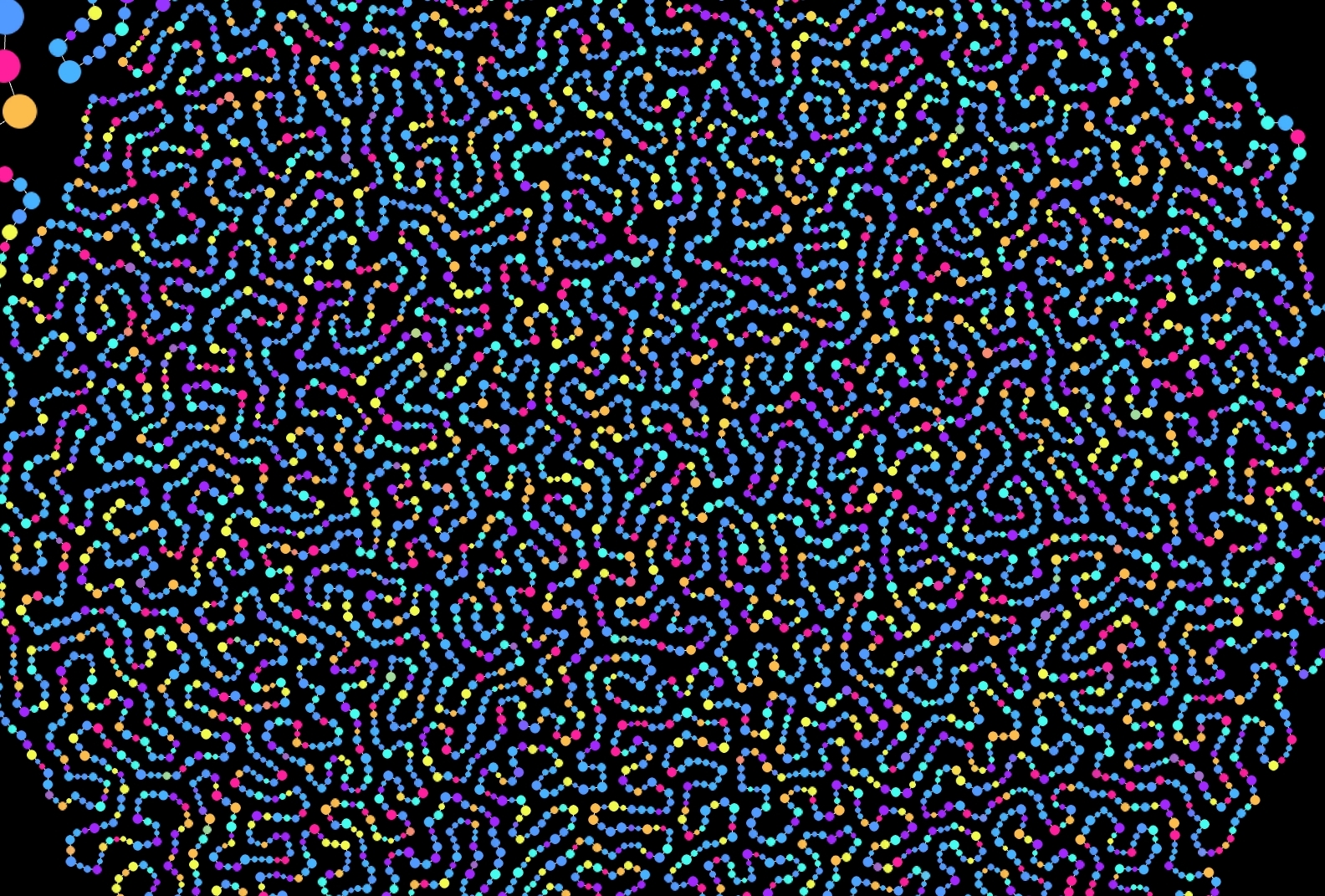
Figure 4.6: Pattern that creates a closed network structure (DividePattern.Closed)
CellularGrowth.cs
protected void DivideEdgesClosedKernel(
    int dividableEdgesCount,
    int maxDivideCount = 16
)
{
    // Pattern that splits into a closed network structure
    var kernel = compute.FindKernel("DivideEdgesClosed");
    DivideEdgesKernel(kernel, dividableEdgesCount, maxDivideCount);
}

// Common processing in split patterns
protected void DivideEdgesKernel(
    int kernel,
    int dividableEdgesCount,
    int maxDivideCount
)
{
    // Prevent Consume from being called when the object pool is empty
    // Compare maxDivideCount with the size of each object pool
    maxDivideCount = Mathf.Min(dividableEdgesCount, maxDivideCount);
    maxDivideCount = Mathf.Min(particlePool.CopyPoolSize(), maxDivideCount);
    maxDivideCount = Mathf.Min(edgePool.CopyPoolSize(), maxDivideCount);
    if (maxDivideCount <= 0) return;

    compute.SetBuffer(
        kernel, "_Particles",
        particlePool.ObjectPingPong.Read
    );
    compute.SetBuffer(
        kernel, "_ParticlePoolConsume",
        particlePool.PoolBuffer
    );
    compute.SetBuffer(kernel, "_Edges", edgePool.ObjectBuffer);
    compute.SetBuffer(kernel, "_EdgePoolConsume", edgePool.PoolBuffer);

    compute.SetBuffer(kernel, "_DividablePoolConsume", dividablePoolBuffer);
    compute.SetInt("_DivideCount", maxDivideCount);

    Dispatch1D(kernel, maxDivideCount);
}
The function divide_edge_closed used in the GPU kernel (DivideEdgesClosed) that generates a closed network structure changes the processing according to the number of Edges that the Particle has.
If the number of connections of one of the particles is 1, connect them with Edge so as to draw a triangle with 3 particles added to the split particles. ( Fig. 4.7 )
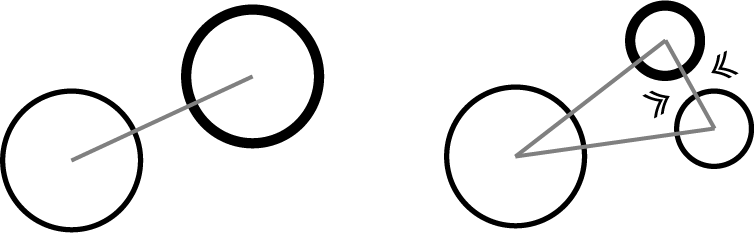
Figure 4.7: Two particles and split particles form a closed network in a triangular shape.
In other cases, the Edge is connected so that the split particle is inserted between the two existing particles, and the Edge that was connected to the split source particle is converted to maintain a closed network. I will. ( Fig. 4.8 )
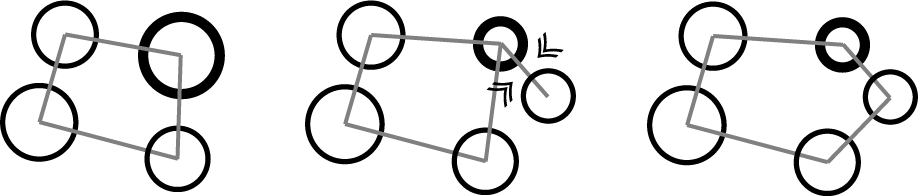
Figure 4.8: Insert a split particle between two existing particles and adjust the Edge connectivity to maintain a closed network.
By repeating this division process, a closed network structure grows.
CellularGrowth.compute
// A function that performs a split into a closed network structure
void divide_edge_closed(uint idx)
{
  Edge e = _Edges[idx];

  Particle pa = _Particles[e.a];
  Particle pb = _Particles[e.b];

  if ((pa.links == 1) || (pb.links == 1))
  {
    // Divide into a triangle with 3 particles and connect them with Edge
    uint cidx = divide_particle(e.a);
    connect(e.a, cidx);
    connect(cidx, e.b);
  }
  else
  {
    // Generate a Particle between two Particles and
    // Connect Edges so that they are connected
    float2 dir = pb.position - pa.position;
    float2 offset = normalize(dir) * pa.radius * 0.25;
    uint cidx = divide_particle(e.a, offset);

    // Connect the parent particle and the split child particle
    connect(e.a, cidx);

    // Edge that connected the original two Particles,
    // Convert to Edge connecting split child Particles
    InterlockedAdd(_Particles[e.a].links, -1);
    InterlockedAdd(_Particles[cidx].links, 1);
    ea = cidx;
  }

  _Edges[idx] = e;
}

...

// Pattern that splits into a closed network structure
THREAD
void DivideEdgesClosed(uint3 id : SV_DispatchThreadID)
{
  if (id.x >= _DivideCount)
    return;

  // Get the index of the splittable Edge
  uint idx = _DividablePoolConsume.Consume();
  divide_edge_closed(idx);
}
Many naturally occurring cells have the property of sticking to other cells. To mimic these properties, Edge pulls two connected particles together like a spring.
Inquiries about springs are realized.
CellularGrowth.cs
protected void Update() {
    ...
    UpdateEdgesKernel();
    SpringEdgesKernel ();
    ...
}

...

protected void UpdateEdgesKernel()
{
    // Calculate the force that the spring attracts for each Edge
    var kernel = compute.FindKernel("UpdateEdges");
    compute.SetBuffer(
        kernel, "_Particles",
        particlePool.ObjectPingPong.Read
    );
    compute.SetBuffer(kernel, "_Edges", edgePool.ObjectBuffer);
    compute.SetFloat("_Spring", spring);

    Dispatch1D(kernel, count);
}

protected void SpringEdgesKernel()
{
    // Apply the spring force of Edge for each particle
    var kernel = compute.FindKernel("SpringEdges");
    compute.SetBuffer(
        kernel, "_Particles",
        particlePool.ObjectPingPong.Read
    );
    compute.SetBuffer(kernel, "_Edges", edgePool.ObjectBuffer);

    Dispatch1D(kernel, count);
}
The following is the contents of the kernel.
CellularGrowth.compute
THREAD
void UpdateEdges(uint3 id : SV_DispatchThreadID)
{
  uint idx = id.x;
  uint count, strides;
  _Edges.GetDimensions(count, strides);
  if (idx >= count)
    return;

  Edge e = _Edges[idx];

  // Initialize the attractive force
  e.force = float2(0, 0);

  if (!e.alive)
  {
    _Edges[idx] = e;
    return;
  }

  Particle pa = _Particles[e.a];
  Particle pb = _Particles[e.b];
  if (!pa.alive || !pb.alive)
  {
    _Edges[idx] = e;
    return;
  }

  // Measure the distance between the two Particles,
  // Apply force to attract if you are too far away or too close
  float2 dir = pa.position - pb.position;
  float r = pa.radius + pb.radius;
  float len = length(dir);
  if (abs(len - r) > 0)
  {
    // Apply force to the proper distance (sum of radii of each other)
    float l = ((len - r) / r);
    float2 f = normalize(dir) * l * _Spring;
    e.force = f;
  }

  _Edges[idx] = e;
}

THREAD
void SpringEdges(uint3 id : SV_DispatchThreadID)
{
  uint idx = id.x;
  uint count, strides;
  _Particles.GetDimensions(count, strides);
  if (idx >= count)
    return;

  Particle p = _Particles[idx];
  if (!p.alive || p.links <= 0)
    return;

  // The more connections you have, the weaker your attraction
  float dif = 1.0 / p.links;

  int iidx = (int)idx;

  _Edges.GetDimensions(count, strides);

  // Find the Particles that are connected to you from all Edges
  for (uint i = 0; i < count; i++)
  {
    Edge e = _Edges[i];
    if (!e.alive)
      continue;

    // Apply force when you find a connected Edge
    if (e.a == iidx)
    {
      p.velocity -= e.force * dif;
    }
    else if (e.b == iidx)
    {
      p.velocity += e.force * dif;
    }
  }

  _Particles[idx] = p;
}
By the above processing, it is possible to express how the cells composed of the network grow.
Various division patterns can be designed by adjusting the judgment of the edge to be divided (dividable_edge function) and the division logic.
In the sample project CellularGrowth.cs, the split pattern can be switched by the enum parameter.
In the branching pattern, the division is performed as shown in Figure 4.9 below .
Split child Particles connect only to the parent Particle. A branched network grows just by repeating this.
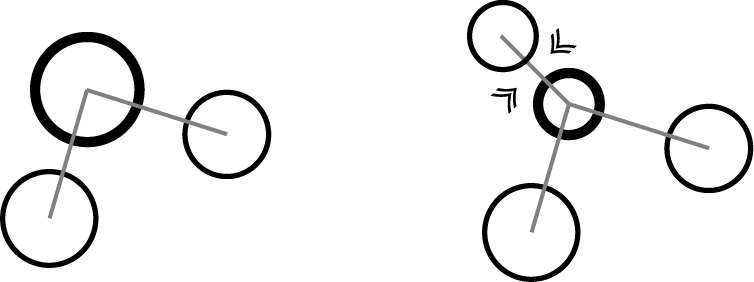
Figure 4.9: Branching split pattern
CellularGrowth.cs
protected void DivideEdgesBranchKernel(
    int dividableEdgesCount,
    int maxDivideCount = 16
)
{
    // Execute a branching split pattern
    var kernel = compute.FindKernel("DivideEdgesBranch");
    DivideEdgesKernel(kernel, dividableEdgesCount, maxDivideCount);
}
CellularGrowth.compute
// Function that performs branching
void divide_edge_branch(uint idx)
{
  Edge e = _Edges[idx];
  Particle pa = _Particles[e.a];
  Particle pb = _Particles[e.b];

  // Get the Particle index with the smaller number of connections
  uint i = lerp(e.b, e.a, step(pa.links, pb.links));

  uint cidx = divide_particle(i);
  connect(i, cidx);
}

...

// Branching split pattern
THREAD
void DivideEdgesBranch(uint3 id : SV_DispatchThreadID)
{
  if (id.x >= _DivideCount)
    return;

  // Get the index of the splittable Edge
  uint idx = _DividablePoolConsume.Consume();
  divide_edge_branch(idx);
}
In a branching pattern, the logic that determines which edges are split has a significant visual impact. You can control the degree of branching by changing the value of the maximum number of connections (_MaxLink) of the Particles referenced in the dividable_edge function.
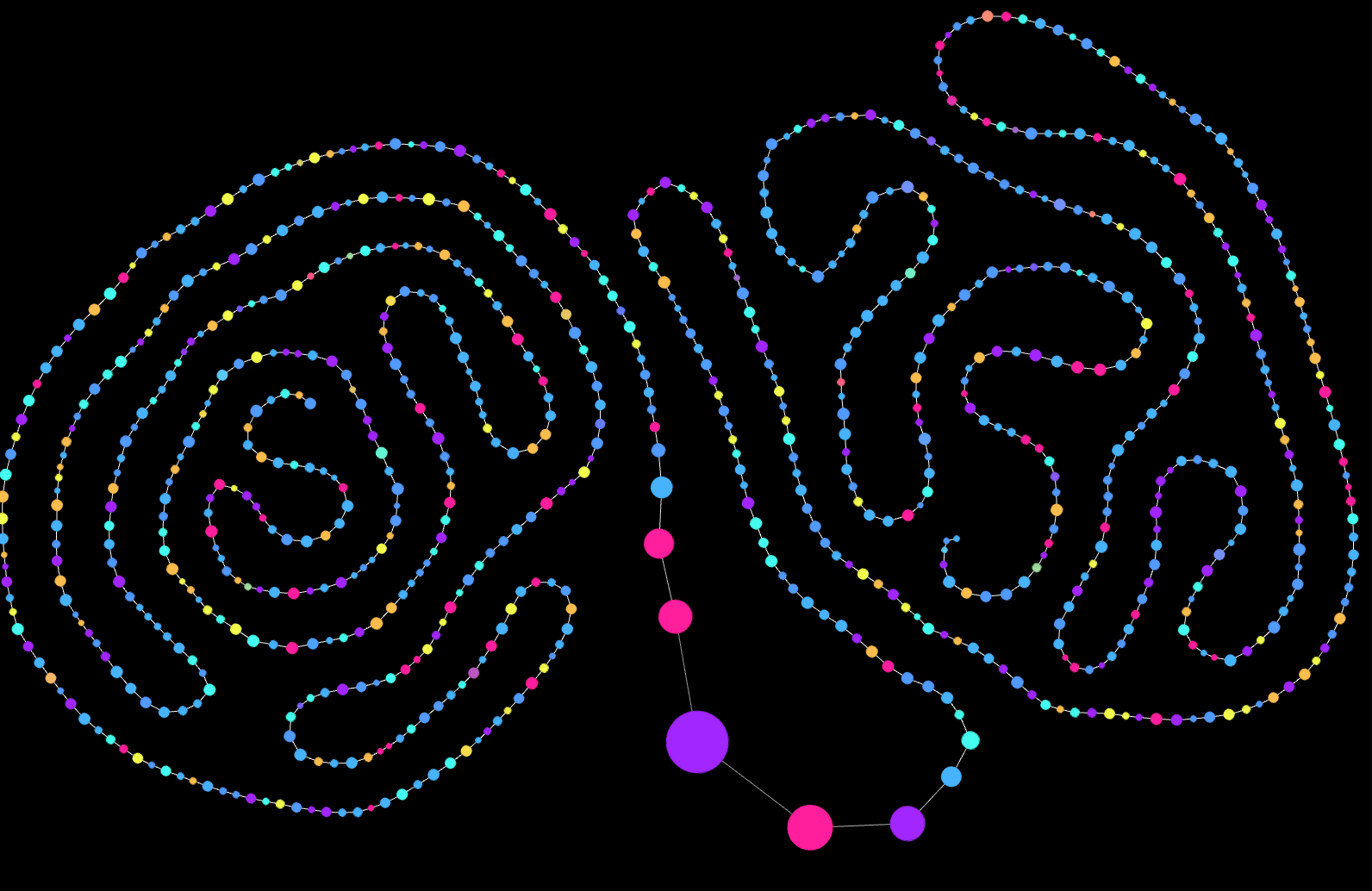
Figure 4.10: Pattern with _MaxLink set to 2 (DividePattern.Branch)
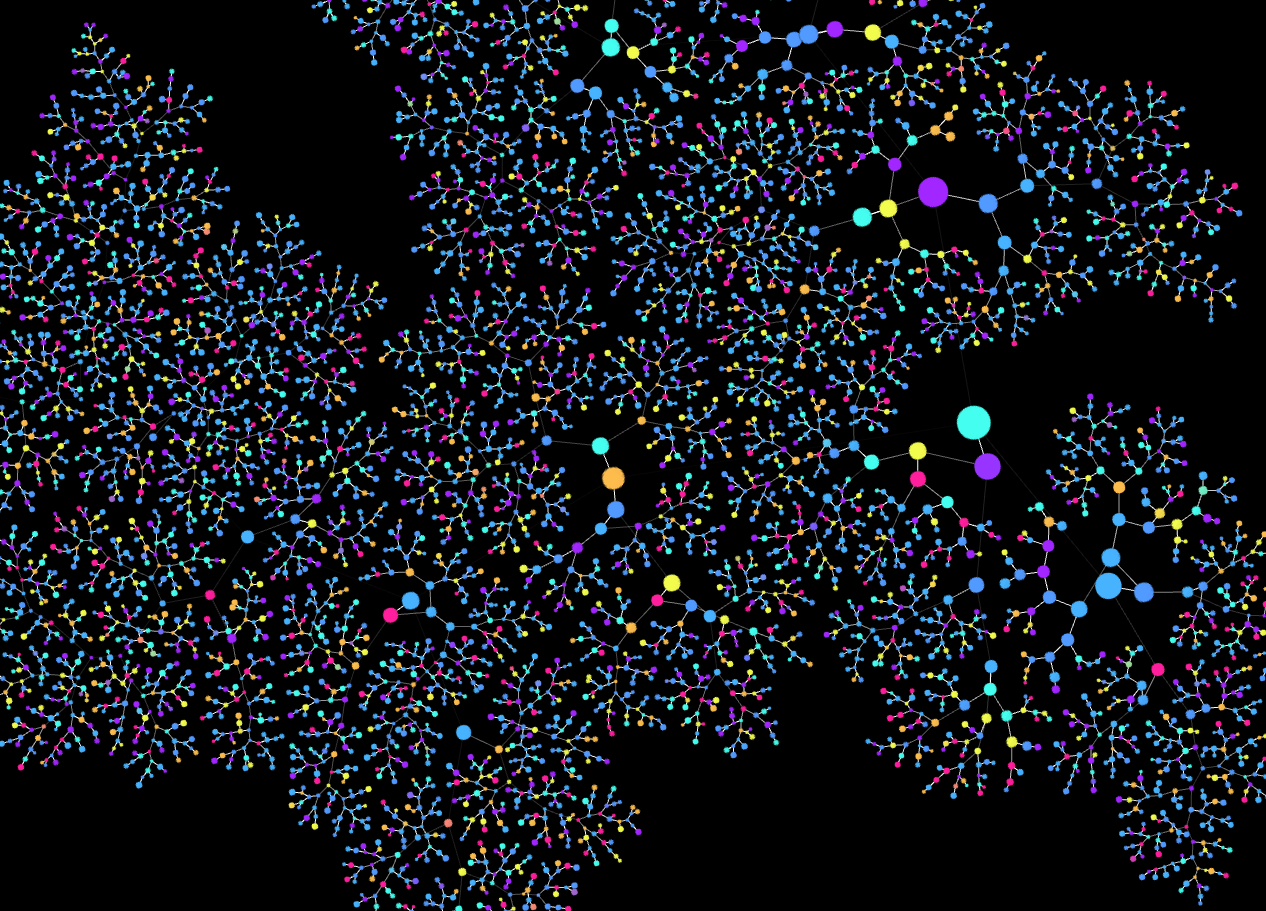
Figure 4.11: Pattern with _MaxLink set to 3 (Divide Pattern.Branch)
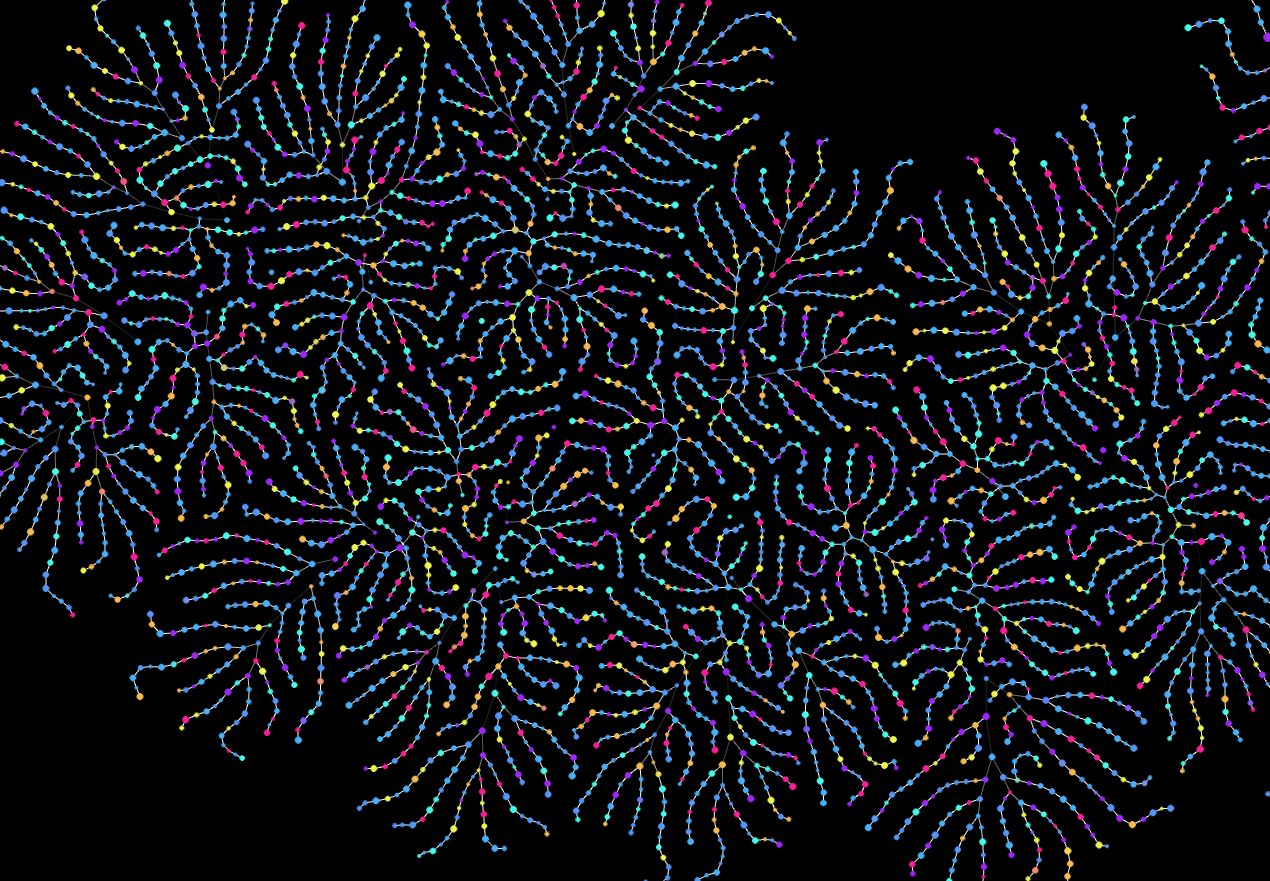
Figure 4.12: A pattern in which _MaxLink was set to 3 to grow to some extent and then set to 2 to continue growing (Divide Pattern.Branch).
In this chapter, we introduced a program that simulates cell division and growth on the GPU.
Other attempts to generate CG with such cells as motifs include the Morphogenetic Creations project by Andy Lomas * 7 and the Computational Biology project by JAKaandorp * 8 for academic purposes , especially the latter in biology. We are doing a more realistic simulation based on it.
Also, Max Cooper's music video * 10 by Maxime Causeret * 9 is an example of a wonderful video work using organic motifs such as cells. (Houdini is used for the simulation part in this video work)
This time, it was limited to those that split and grow in two dimensions, but as shown in the original iGeo tutorial * 12 , this program can also be extended in three dimensions.
In the extension to three dimensions, it is also possible to realize a mesh that grows organically with Gniguni by using a cell network that consists of three cells and grows and spreads. Samples of 3D extensions are available at https://github.com/mattatz/CellularGrowth, so if you are interested, please refer to them.
[*7] http://www.andylomas.com/
[*8] https://staff.fnwi.uva.nl/j.a.kaandorp/research.html
[*9] http://teresuac.fr/
[*10] https://vimeo.com/196269431
[*11] https://www.sidefx.com/
[*12] http://igeo.jp/tutorial/56.html